How to Ban users in Ventrilo

This tutorial will walk you through the process of being able to Ban unwanted users from your Ventrilo server.

  1. Connect to your server.      (How to connect to your server)

  2. Login as Ventrilo administrator.      (How to login as admin)

  3. Ban the user using the following steps:
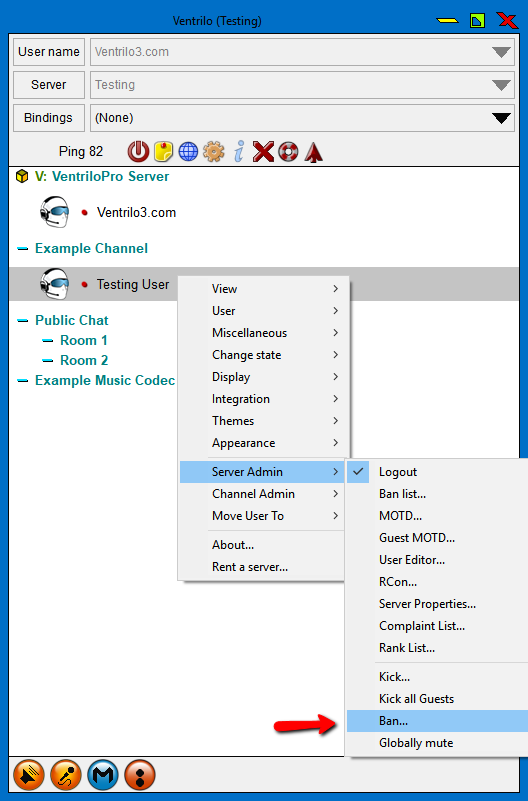
    1. Right click on the users name
    2. Navigate down to "Server Admin"
    3. Under "Server Admin" click on the "Ban" option

    Right click ban user

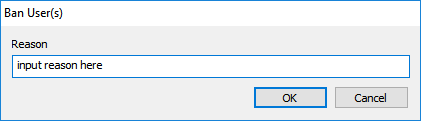
  4. Type in the reason for the Ban.
    In the box that appeared you will want to type in the reason for the ban (if any). This message will be displayed to the person that is getting Banned.

    ban reason

  5. Click ok.
    Click ok and the user will be Banned from the server.

Still stuck? Open a trouble ticket at https://cp.light-speed.com/trouble-tickets.php or see all Ventrilo Server guides.

© Copyright 2004-2026 LightSpeed Gaming LLC
Ventrilo is a Trademark of LightSpeed Gaming LLC.

Try GameVox — next-gen voice chat for gamers (open beta)