How to create Channel Administrators
This tutorial will go through the steps of Assigning Channel Admins for your users inside of Ventrilo.
-
-
-
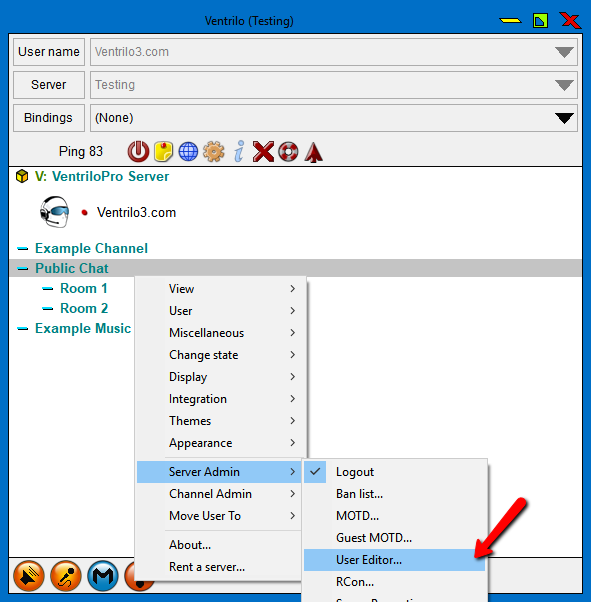
Bring up the "User Editor" window
- Right click anywhere in the white space in the main Ventrilo screen to open up the menu.
- Navigate down to "Server Admin"
- Click on "User Editor"
-
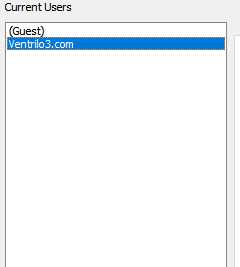
Click the user you want to give Channel Admin to
This assumes that you already have a Username created for the person you want to assign channel admin to. If you do not have a user created yet you can check our other Ventrilo tutorials and come back to this step once you have done so.
-
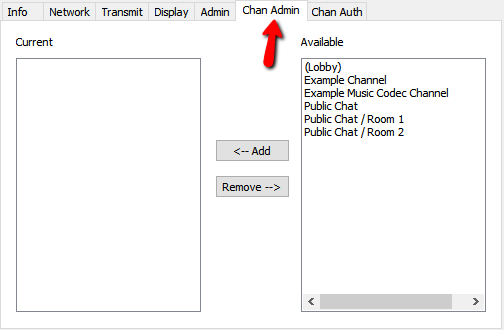
Click the "Chan Admin" tab
-
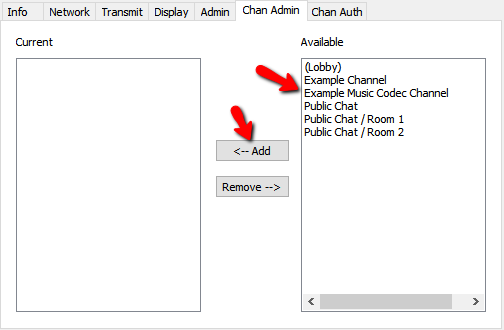
Add the channels to Current side
- Click the Channel you want to give admin to
- Click the "Add Button"
- Repeat this proccess if you would like to give admin to multiple channels
-
Update the User
Click the update button in the bottom right to finalize the settings for the user.

Still stuck? Open a trouble ticket at https://cp.light-speed.com/trouble-tickets.php or see all Ventrilo Server guides.
|